Shop NobiExplore Shop Nobi

NU1 Air Mac / RD1 Pro WIN

Two monitors.
Two different screens?

A second connector can show a second copy. Check the display path before buying a Baseus dock.

Check your setup ↓

US models and prices checked October 17, 2026. Manufacturer specifications, not hands-on testing.

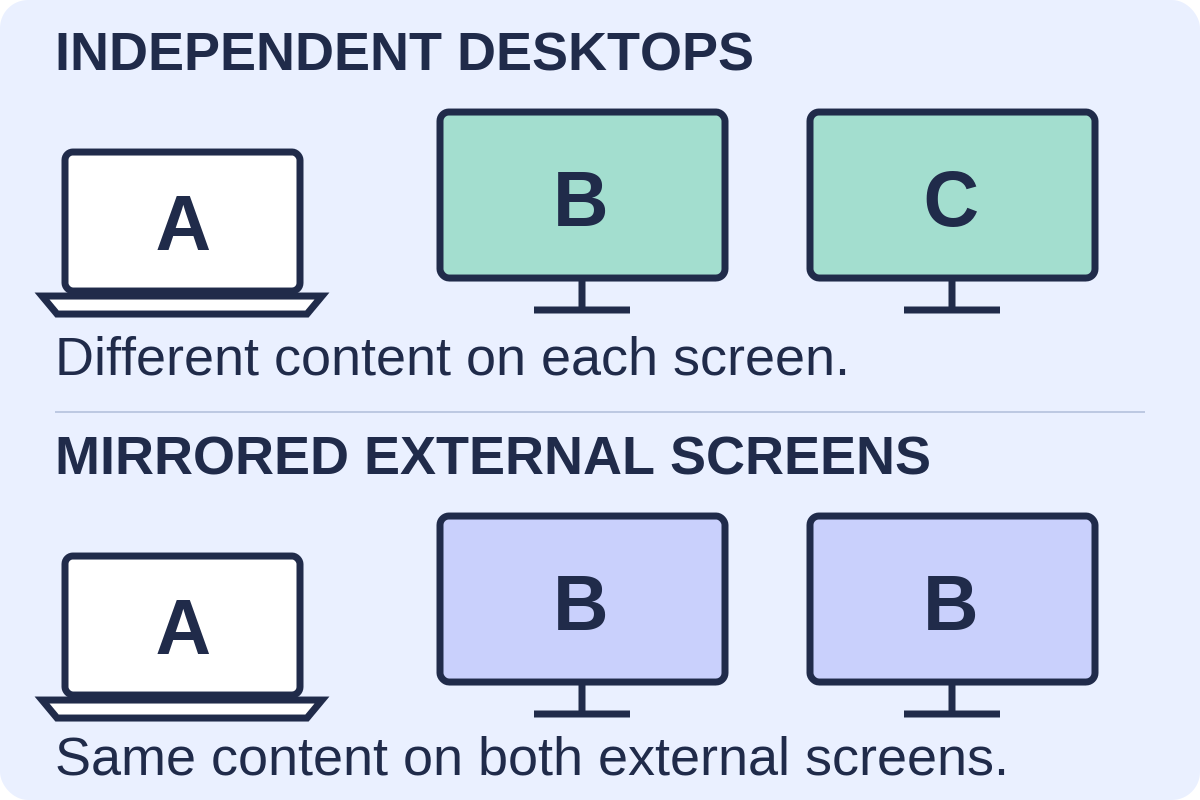
Independent displays show A, B and C. Mirrored external displays show A, B and B. Connector count does not establish independent desktops.
Letters show different content. This diagram explains the layouts, not every laptop’s native display limit.

Mac + RD1? Its two external outputs mirror.

NU1 + two screens? Verify DisplayLink and the 1440p60 table.

Windows + dual 4K60? RD1 needs the DP1.4 + DSC path.

Check the exact setup.

“I don’t know” is useful. We’ll show what is missing instead of guessing. These controls calculate locally; using them does not run a product search.

1. Your laptop and screens
2. Verify ports, cables and software Needed for a conditional fit
Baseus requires a full-featured host. A port without laptop charging needs exact confirmation, even if you use separate power.
Confirm OS support, installation access and required Mac permissions. Nothing is installed here.
HDMI or DP in Video 1, plus HDMI or DP in Video 2. Two in one group are not independent.
DSC is Display Stream Compression. Do not assume it from a port name.
3. Keep laptop charging separate Optional, but not assumed

A conditional fit uses your confirmations and the dated source claims. It is not a hardware compatibility certification.

Needs checking

NU1 Air Mac

B0114400 · manufacturer B01144

Displays Needs checking

  • Add your exact laptop model and its manufacturer specification link.
  • Check the selected host port's data, DP Alt Mode and full-featured compatibility. Source
  • Confirm the requested resolution/refresh across the exact host, monitor and cables. Source
8 checks need attention; see all reasoning
  • Add your exact laptop model and its manufacturer specification link.
  • Check the selected host port's data, DP Alt Mode and full-featured compatibility. Source
  • Confirm the requested resolution/refresh across the exact host, monitor and cables. Source
  • Decide whether the built-in screen must remain on. Source
  • An adapter, extra hub or unknown connection needs its own supported-path evidence. Source
  • Check the exact OS and supported software version; older/other releases are not assumed compatible. Source
  • Verify a supporting DisplayLink version, installation access and required permissions. Source
  • Use one HDMI or DP connector from each of the two NU1 video groups. Source
  • The simultaneous-display table documents two 1440p60 screens. Source

Laptop charging Needs checking

  • Decide whether this dock must charge your laptop.
See all checks and sources
  • Decide whether this dock must charge your laptop.

US price checked: $199.99Before tax or extras. Recheck the current price.

We may earn a commission from qualifying purchases through these links.

Manufacturer details: NU1 Air Mac

Opens Baseus. This link does not mean the dock fits your answers.

Needs checking

RD1 Pro WIN

B0114600 · manufacturer B01146

Displays Needs checking

  • Add your exact laptop model and its manufacturer specification link.
  • Check the selected host port's data, DP Alt Mode and full-featured compatibility. Source
  • Confirm the requested resolution/refresh across the exact host, monitor and cables. Source
7 checks need attention; see all reasoning
  • Add your exact laptop model and its manufacturer specification link.
  • Check the selected host port's data, DP Alt Mode and full-featured compatibility. Source
  • Confirm the requested resolution/refresh across the exact host, monitor and cables. Source
  • Decide whether the built-in screen must remain on. Source
  • An adapter, extra hub or unknown connection needs its own supported-path evidence. Source
  • Check the exact OS and supported software version; older/other releases are not assumed compatible. Source
  • Check the host's DP version and DSC support for simultaneous outputs. Source

Laptop charging Needs checking

  • Decide whether this dock must charge your laptop.
See all checks and sources
  • Decide whether this dock must charge your laptop.

US price checked: $299.99Before tax or extras. Recheck the current price.

We may earn a commission from qualifying purchases through these links.

Manufacturer details: RD1 Pro WIN

Opens Baseus. This link does not mean the dock fits your answers.

Neither is a fit? Keep a working setup. Check your laptop’s existing native display ports and exact limits before buying another dock. This selector covers only these two models.

What the source tables actually say

NU1 Air Mac

One 4K60 display, or two 1440p60 displays through DisplayLink. Choose HDMI or DP from each of two video groups.

Broad “dual 4K” marketing conflicts with the simultaneous-display table. We do not treat dual 4K60 as verified.

The charger and cables are separate. With the documented 100W input, Baseus shows 90W to the laptop with one USB port in use, or 75W with all USB ports in use.

RD1 Pro WIN

On macOS, two connected external outputs mirror. Native Mac multi-display support does not change this dock’s behavior.

On Windows: DP1.4 + DSC lists dual 4K60; DP1.4 without DSC lists dual 4K30; DP1.2 lists dual 1080p60. The manufacturer manual also lists dual 1440p60 without DSC.

The Windows DP1.2 single-screen row lists 4K30 on both HDMI outputs. Single 4K120 belongs to HDMI2 and a capable complete path. Its included 180W supply feeds a shared 160W output budget, with up to 100W for the host.

Choosing a separate charger for two devices? Compare their targets with the charger’s shared port outputs. This separate worksheet does not calculate a dock’s own power budget.

USB-C data and charging sockets are not monitor outputs. Unlisted mixed modes, adapter chains and special uses remain unverified here.

Sources, dates and limits

Checked October 17, 2026. We have not physically tested these docks. A conditional result means the source documents the mode and you confirmed the remaining setup conditions.

The current Mac DisplayLink page lists Manager 17.0 for macOS 14, 15, 26 and 27; older releases have separate legacy downloads. Check the exact version and permissions with your administrator. Nothing is downloaded or installed by this selector.

The two manufacturer-authored manuals below are mirrored copies. Baseus’s official selector exposed manual links, but its PDF CDN could not be read during this check. We cannot match those copies to the latest hardware revision. The key Mac-mirroring, DSC and simultaneous-display distinctions are also supported by current official product diagrams.

Apple’s linked page covers named current Air models; other Mac models need their own specification. DisplayLink can interfere with protected video. Gaming, HDR/VRR, color-critical work and pre-login behavior are not established by these office-display claims.