Here's what happens dozens of times a day on your ecommerce store - and you probably don't even know it.
A shopper lands on your site. Maybe from an ad you paid $3 for. Maybe from an organic link you spent months building. They have intent. They have money. They type something into your search bar.
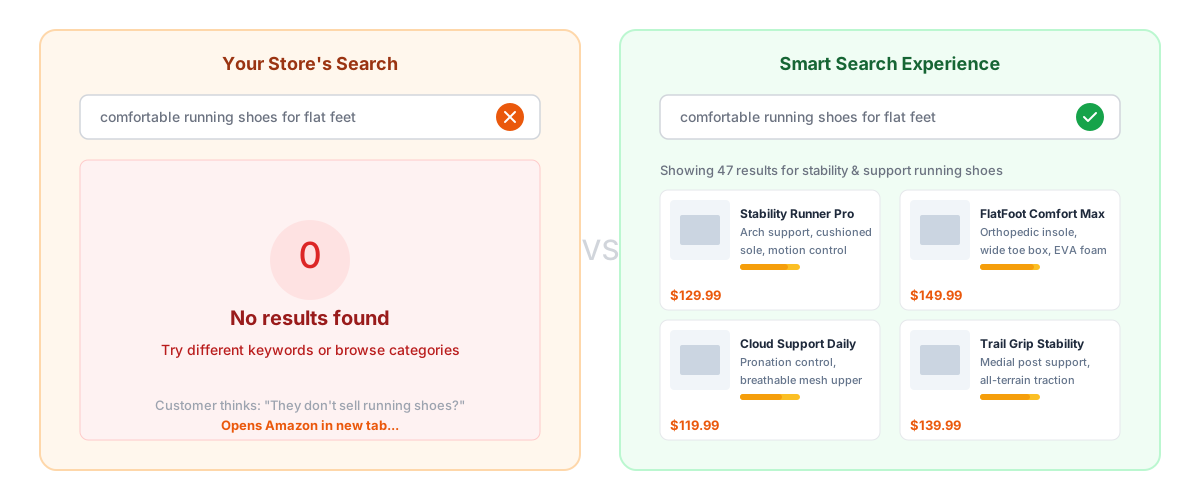
And your search returns garbage. Or worse: nothing.
So they do exactly what you'd do. They open a new tab and search on Amazon instead.
You just paid to acquire a customer and then pushed them directly to your biggest competitor. Not through bad pricing. Not through poor product selection. Through a search bar that doesn't understand human language.
This is happening at scale across ecommerce. Opensend research estimates $300 billion is lost annually because of poor site search. That's not a rounding error. That's a category-defining problem.
!Your store's failed search vs smart search results
The Amazon Search Standard (And Why Shoppers Expect It)
Amazon has spent over two decades training shoppers to expect search that just works, and there's a lot ecommerce stores can learn from Amazon's search experience. Think about what happens when you search Amazon:
- You type "something warm for winter" and get relevant coats, not error messages
- You misspell "sweatter" and still see sweaters
- You search for "gift for 10 year old boy" - a completely subjective query - and get curated results
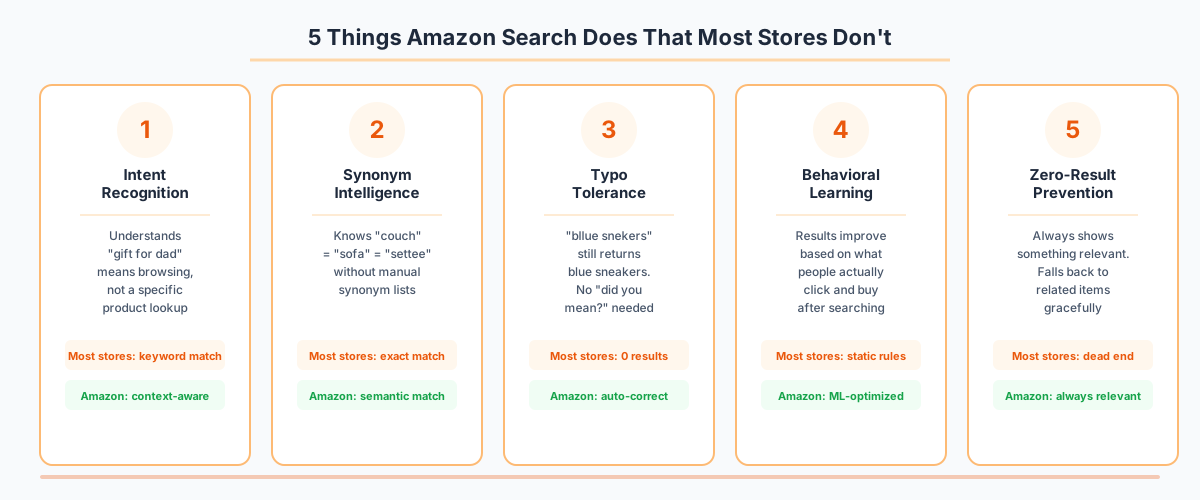
This isn't magic. It's intentional engineering around five core principles that most ecommerce stores completely ignore.
1. Intent Recognition
Amazon doesn't just match keywords. It understands what you're trying to do. "Gift for dad" is browsing behavior - show variety. "iPhone 15 Pro Max 256GB Natural Titanium" is a specific lookup - show that exact item.
Most stores treat every query the same way: find keywords, return matches. That's like answering every question with a Wikipedia article.
2. Synonym Intelligence
Amazon knows that "couch" equals "sofa" equals "settee." It knows "sneakers" equals "trainers" equals "athletic shoes." This isn't a manually maintained synonym list - it's learned from billions of search interactions.
Your store? Someone searches "couch" and you only show results tagged as "sofa." The shopper thinks you don't sell couches. Amazon does. Tab closed. Sale lost.
3. Typo Tolerance
Roughly one in ten ecommerce search queries contain typos. On Amazon, "bllue snekers" returns blue sneakers. On most DTC sites, it returns nothing.
Think about that. 10% of your search users are one typo away from a dead end that sends them to Amazon.
4. Behavioral Learning
Amazon's search gets smarter over time. When thousands of people search "phone case" and click on iPhone cases, the algorithm learns that "phone case" likely means iPhone case (because that's the most popular phone). Results re-rank automatically based on real behavior.
Most ecommerce search is static. The results for a query today are the same results you'd get in six months, regardless of what people actually want.
5. Zero-Result Prevention
Amazon almost never shows a zero-result page. Even for bizarre queries, it gracefully falls back to related products. Your store? Baymard Institute found that 72% of ecommerce sites fail basic search expectations, with zero-result pages being one of the most common failures.
!5 things Amazon search does that most stores don't
The Emotional Math of Search Failure
Here's what makes this so painful: search users are your best customers.
They arrive with intent. They know what they want. They're ready to buy. Data consistently shows that search users convert 2-3x higher than browsers. They represent about 15% of your traffic but generate up to 45% of your revenue.
When you fail these people, you're not losing average customers. You're losing your highest-value visitors. The ones who came ready to buy.
And the emotional response to a failed search is devastating for your brand. When a shopper types something perfectly reasonable - "red dress for cocktail party" - and gets nothing back, they don't think "I should try different keywords." They think "this store doesn't have what I need" or worse, "this store is broken."
That perception sticks. They don't come back. And your customer acquisition cost for that visitor was completely wasted.
You Don't Need to Beat Amazon. You Need to Stop Pushing People There.
Let's be clear: this isn't about outperforming Amazon. You have advantages Amazon doesn't - curated selection, brand identity, specialized expertise, customer relationships. You don't need to win the search war.
You just need to stop losing it.
The bar isn't "better than Amazon." The bar is "good enough that people don't feel the need to leave." That's a much more achievable goal, and modern tools make it accessible to stores of every size.
What "Good Enough" Search Actually Looks Like
Understand natural language. When someone types "comfortable shoes for standing all day," your search should surface arch-support sneakers and cushioned work shoes - not just products with the word "comfortable" in the title.
Handle typos gracefully. No more dead ends because someone fat-fingered a query on their phone. This is table stakes in 2026.
Always return something relevant. Zero-result pages should be extinct. If you don't have an exact match, show the closest thing. Anything is better than a blank page that says "try different keywords."
Learn from behavior. Your search should get smarter as more people use it. If everyone who searches "gift" ends up buying from your bestsellers category, surface bestsellers for gift queries.
Work on mobile. Over 60% of ecommerce traffic is mobile. If your search requires precise typing on a tiny keyboard with no forgiveness for errors, you're actively punishing your largest audience.
The Old Way vs. The New Way
The old way to solve search was painful. You'd hire an agency to implement Algolia or Elasticsearch, spend months configuring it, manually maintain synonym lists, and hire someone to monitor search analytics. Total cost: $50K+ before you saw any results.
Enterprise solutions like Constructor or Bloomreach could run $50K-$200K annually. Great for Walmart. Not realistic for a $5M DTC brand.
The new way? AI-powered search that understands language out of the box. No synonym lists. No manual tuning. No six-month implementation. Tools like Nobi plug into your existing store and immediately start understanding what your shoppers mean, not just what they type.
The technology that was once only available to Amazon-scale companies is now accessible to independent stores. The question isn't whether you can afford smart search - it's whether you can afford to keep losing customers without it.
Three Things You Can Do This Week
1. Audit your zero-result rate. Pull your search analytics. What percentage of searches return no results? If it's above 5%, you have a leaking bucket that needs fixing immediately.
2. Test your own search with real queries. Don't use product names from your catalog. Search the way actual humans do: "something warm for fall," "gift for my girlfriend," "blue shoes for work." Count how many return useful results.
3. Calculate your search revenue loss. Take your monthly search users, multiply by your failure rate, multiply by your average order value, multiply by your search conversion rate. That number is what bad search costs you every month. For most stores, it's shocking.
For a deeper look at search-driven conversions, check out our guide on increasing ecommerce conversion rate through better search. And if you want to understand what shoppers actually expect, read what shoppers want from your site search.
Stop Funding Amazon's Growth
Every failed search on your site is a referral to Amazon. You're paying for traffic, bringing people to your store, and then sending them to a competitor because your search bar can't understand "blue sneakers."
That's not a technology limitation anymore. It's a choice.
The tools exist. The price point is accessible. The implementation is fast. The only thing standing between your store and search that actually works is the decision to make it happen.
FAQ
{meta.faqItems.map((item, index) => ( <details key={index}> <summary>{item.question}</summary> <p>{item.answer}</p> </details> ))}