Everyone talks about conversion rate optimization. A/B test the button color. Optimize the checkout flow. Improve product photography. Write better copy.
These are fine optimizations. But there's one lever that most CRO teams completely overlook - and it routinely delivers 30-200% conversion lifts without touching a single product page.
Your site search.
Think about the math. Search users convert at 2-3x the rate of non-search users. They represent about 15% of traffic but generate up to 45% of revenue. When you improve search, you're optimizing for your highest-intent, highest-value visitors.
A 1% conversion improvement across all visitors is hard. A 50% conversion improvement for search users specifically? That's achievable with the right optimizations - and it moves the needle just as much (or more) on total revenue.
!Conversion rate lift from search optimizations
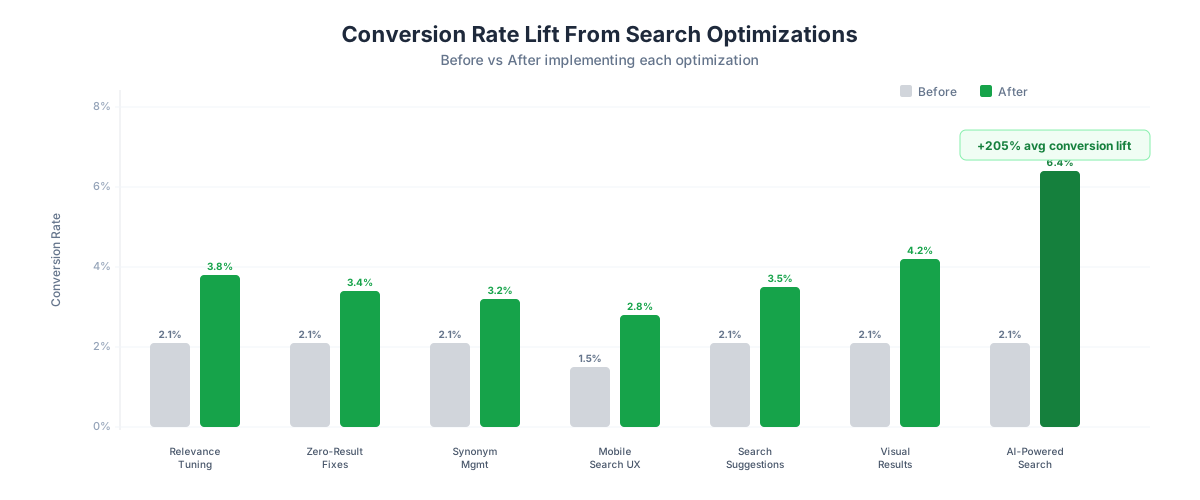
The 7 Search Optimizations That Actually Move Conversion
We've ranked these by impact and implementation difficulty. Start at the top and work your way down.
1. Relevance Tuning - Expected Lift: 40-80%
The most fundamental search optimization is also the most neglected: do your results actually match what people are looking for?
Most ecommerce search engines use basic text matching - if the query words appear in the product title or description, it's a match. This produces technically accurate but practically useless results. "Blue running shoes" returns every product with "blue," "running," or "shoes" in the description, ranked by some arbitrary score.
What to fix:
- Boost exact phrase matches over partial matches
- Weight product titles higher than descriptions
- Factor in popularity and conversion data for ranking
- Prioritize in-stock items over out-of-stock
- Test relevance with your top 50 search queries manually
How to measure: Pull your top 50 queries. For each, check if the first 3 results are what a reasonable shopper would expect. If fewer than 70% pass this test, relevance tuning will deliver massive gains.
2. Zero-Result Elimination - Expected Lift: 30-60%
Every zero-result page is a conversion killer. The shopper typed something in, your site said "nothing found," and now they're gone. Baymard Institute data shows that 72% of sites fail basic search expectations, and zero results are the worst offender.
What to fix:
- Implement fuzzy matching for typos (critical for mobile users)
- Add automatic fallback to related products when exact matches don't exist
- Replace "No results found" with "We didn't find an exact match, but here are similar items"
- Log every zero-result query and manually fix the top offenders weekly (see our full guide to fixing zero-result searches)
How to measure: Your search analytics should track zero-result rate. Best-in-class is under 2%. Most stores are at 10-15%. Every percentage point you reduce translates directly to recovered revenue.
3. Synonym Management - Expected Lift: 25-50%
Your customers call products by different names than your catalog uses. "Couch" vs. "sofa." "Sneakers" vs. "trainers." "Hoodie" vs. "pullover sweatshirt." If your search only matches catalog terms, you're invisible to everyone using different vocabulary.
What to fix:
- Build a synonym dictionary from your zero-result and low-result queries
- Map common regional and generational vocabulary differences
- Include brand-specific terms (people search for "Birkenstocks" meaning any cork-sole sandal)
- Update synonyms monthly based on search analytics
How to measure: Search for 20 common products using 3 different terms each. If any term returns zero or irrelevant results, you have a synonym gap.
4. Mobile Search UX - Expected Lift: 45-90%
Over 60% of ecommerce traffic is mobile, but most stores treat mobile search as an afterthought. A tiny search icon in the header, a cramped input field, results that require pinching and zooming. Mobile shoppers who use search are extremely high-intent - don't punish them with bad UX.
What to fix:
- Make the search bar prominent and easy to tap (not hidden behind an icon)
- Use a full-screen search overlay on mobile
- Implement large, thumb-friendly tap targets in results
- Show product images prominently in mobile search results
- Add voice search for hands-free queries
- Reduce result density - 2 products per row, not 3
How to measure: Compare mobile search conversion rate to desktop. If mobile is more than 30% lower, you have a mobile UX problem, not a mobile traffic problem.
5. Search Suggestions - Expected Lift: 20-40%
Autocomplete and search suggestions guide shoppers toward queries that will actually return good results. Instead of letting someone type "comfy sho" and submit a broken query, show them "comfortable shoes," "comfortable shoes for standing," and "comfortable dress shoes." You can go further and guide shoppers who don't know what to search for with tappable suggestion pills.
What to fix:
- Implement predictive autocomplete that triggers after 2-3 characters
- Show product images and prices in suggestion dropdowns
- Highlight popular searches and trending items
- Show category suggestions alongside product suggestions
- Ensure suggestions work on mobile with large tap targets
How to measure: Track the percentage of searches that begin from a suggestion vs. manual full-query entry. Higher suggestion usage correlates with higher conversion because suggestions lead to queries with better results.
6. Visual Search Results - Expected Lift: 50-100%
A search results page that shows a plain text list of product names is a conversion killer. Shoppers need to see products to evaluate them. Product images, prices, ratings, and availability badges in search results dramatically reduce the friction between search and purchase.
What to fix:
- Show product images as the primary element in search results
- Display price, star ratings, and review counts inline
- Add "Add to Cart" or "Quick View" buttons directly in search results
- Show availability status (in stock, low stock, out of stock)
- Use a grid layout that maximizes visual information density
How to measure: If your search results page has a higher bounce rate than your category pages, your search results presentation is likely the problem.
7. AI-Powered Search - Expected Lift: 150-200%+
This is the big one. AI-powered search platforms like Nobi handle all six optimizations above simultaneously, plus capabilities that manual tuning can never achieve: true natural language understanding, contextual intent recognition, and continuous learning from user behavior.
When a shopper types "something comfortable for a long flight," natural language search understands they want travel clothes - stretchy fabrics, wrinkle-resistant, layer-friendly. No amount of synonym lists or relevance rules captures this level of understanding.
What to fix:
- Replace your keyword-matching search engine with an AI-powered solution
- Ensure the AI understands your specific product domain
- Configure the system to learn from click and purchase behavior
- Set up analytics to monitor and compare pre/post performance
How to measure: A/B test AI search against your current search for 2-4 weeks. Compare conversion rate, revenue per search session, zero-result rate, and search exit rate.
!Search CRO optimization scorecard
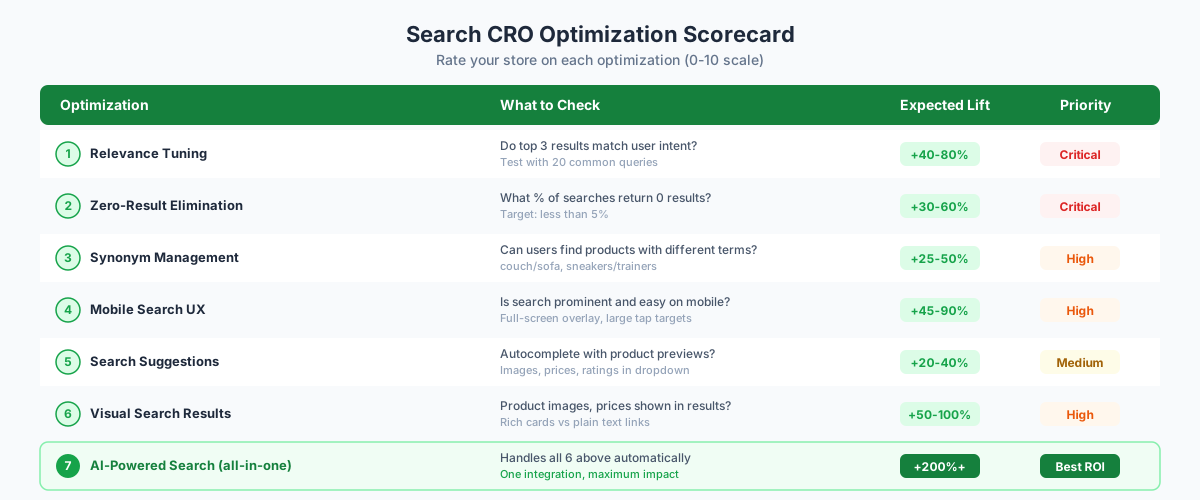
The Compounding Effect
Here's what makes search CRO so powerful: these optimizations compound. Fixing relevance helps every query. Eliminating zero results saves your worst-performing searches. Better mobile UX lifts your largest traffic segment.
Stack three or four of these together and you're not looking at incremental improvement - you're looking at a fundamentally different conversion trajectory.
And because search users are already your highest-value segment, the revenue impact is disproportionately large relative to the effort involved.
Where to Start
If you're overwhelmed by the list above, here's the priority order:
1. This week: Audit your zero-result rate and fix the top 10 failing queries 2. This month: Improve search result presentation with images, prices, and ratings 3. This quarter: Evaluate AI-powered search solutions that handle everything in one integration
The stores getting this right are seeing search conversion rates of 5-8% instead of the 2-3% average. On a store doing 15,000 monthly search sessions at an $85 AOV, that's the difference between $25,500 and $68,000 in monthly search-driven revenue.
For more context on what shoppers actually expect from your search, check out what shoppers want from site search. And to quantify what bad search is costing you specifically, see the true cost of bad site search.
If you want to skip straight to addressing all seven optimizations at once, Nobi is built for mid-market and DTC brands that need search that actually moves conversion - without enterprise budgets or implementation timelines.
<div className="my-8 flex justify-center"> <a href="https://dashboard.nobi.ai" className="inline-flex items-center justify-center gap-2 rounded-2xl font-medium transition active:scale-[.98] focus:outline-none focus-visible:ring-2 focus-visible:ring-black/10 dark:focus-visible:ring-white/20 bg-black text-white dark:bg-white dark:text-black hover:opacity-90 shadow-sm h-12 px-6 text-base no-underline" > <span>Get started with Nobi free</span> </a> </div>
FAQ
{meta.faqItems.map((item, index) => ( <details key={index}> <summary>{item.question}</summary> <p>{item.answer}</p> </details> ))}